eDiscoveryDaily

Case Law: Spoliate Evidence and Go to Jail–OR NOT?!?

As previously referenced in eDiscovery Daily, defendant Mark Pappas, President of Creative Pipe, Inc., was ordered by Judge Paul W. Grimm to  “be imprisoned for a period not to exceed two years, unless and until he pays to Plaintiff the attorney’s fees and costs that will be awarded to Plaintiff as the prevailing party pursuant to Fed. R. Civ. P. 37(b)(2)(C).”.

Judge Grimm found that “Defendants…deleted, destroyed, and otherwise failed to preserve evidence; and repeatedly misrepresented the completeness of their discovery production to opposing counsel and the Court.”  As a result, he ordered “that Pappas’s pervasive and willful violation of serial Court orders to preserve and produce ESI evidence be treated as contempt of court”, resulting in the severe sanction.

Pursuant to Magistrate Judge Grimm’s September 9 decision and order and the relevant local rule, however, defendants were allowed to object to the same order. In that briefing, Mr. Pappas’ counsel argued that “[t]his Court’s power to impose a coercive civil contempt sanction … is limited by a party’s ability to comply with the order,” and further that, “[i]f the fee awarded is so large that Mr. Pappas is unable to pay it, the ordered confinement would not be coercive, but punitive, and could not be imposed without criminal due process protections.” Defendants thus requested that Magistrate Judge Grimm’s order be modified such that, following the quantification of the fee award, Mr. Pappas be permitted to demonstrate his inability to pay it, and further to provide that Mr. Pappas would only be confined if he is able to pay but refuses to do so. The District Court agreed with Mr. Pappas’ counsel and, on November 1, 2010, issued a Memorandum and Order holding as follows: “[T]he Court does not find it appropriate to Order Defendant Pappas incarcerated for a future possible failure to comply with his obligation to make payment of an amount to be determined in the course of further proceedings. Certainly, if Defendant Pappas should fail to comply with a specific payment order, the Court may issue an order requiring him to show cause why he should not be held in civil contempt for failure to comply with that payment order. Also, under appropriate circumstances, criminal contempt proceedings might be considered.”

That same day, the Court further ordered that defendants must pay plaintiff the amount of $337,796.37 by November 5 and, if such payment is not made, defendants must appear on November 8 for a civil contempt hearing. Moreover, if defendants failed to pay and Mr. Pappas failed to appear at the civil contempt hearing, “a warrant may be issued for his arrest so that he shall be brought before the Court as soon as may be practicable.” From the docket it appears that ultimately the parties resolved the issue between them without the need for a further contempt proceeding.

So, what do you think?  What will happen next?  Please share any comments you might have (including examples of other cases where sanctions included jail time) or if you’d like to know more about a particular topic.

Case Summary Source: E-Discovery Law Alert, by Gibbons P.C.

Disclaimer: The views represented herein are exclusively the views of the author, and do not necessarily represent the views held by CloudNine Discovery. eDiscoveryDaily is made available by CloudNine Discovery solely for educational purposes to provide general information about general eDiscovery principles and not to provide specific legal advice applicable to any particular circumstance. eDiscoveryDaily should not be used as a substitute for competent legal advice from a lawyer you have retained and who has agreed to represent you.
eDiscovery Project Management: Effectively Manage Your Staff

An important part of managing a project is effectively managing the people doing the work and keeping them motivated.  This is especially critical when you need a lot of people for a task – for example, a document review project.  One weak link can result in poor work that needs to be redone.

Volumes have been written on this topic, and it may be worthwhile to do some reading on management skills.  However, let me give you a few suggestions that have worked well for me:

  • Know your people and make assignments that are in sync with their skills, strengths and preferences.  You will always get better results if you give people work at which they are likely to shine.
  • Get people on board with the assignment.  Make sure they understand the bigger picture, where their work fits in, and why it’s important to the case.
  • Give people clear instructions and good training.
  • Be available to them.  Make sure your staff knows how to reach you.
  • Regardless of what you are faced with, stay calm.  Panic on your part will instill panic in those doing work for you.  This never works out well.
  • Ask for input, suggestions and opinions.  This has two benefits:  you are likely to get good ideas that you’ll want to implement, and your staff will feel appreciated.
  • Don’t micro-manage your staff.  Monitor them enough to catch problems, but give them room to do their jobs.
  • Give lots of feedback.  Make sure people know when they are doing a good job, and make sure they know when you want them to change the way they are doing something.
  • Recognize and acknowledge good work.  When someone does a good job on a project that I’m managing, I write a thank you memo.  I describe the assignment, what they did, and how their efforts contributed to the overall goals and success of the project.  And I always copy senior people on that memo.  I have yet to find a better way to keep morale high for people doing good work.

What do you think?  Do you have some tips for managing people that you can share with us?  Please share any comments you might have or tell us if you’d like to know more about a topic.

eDiscovery Project Management: Maintain Good Records

Project documentation is a weakness that I’ve seen time and again in firms that I’ve helped.  And, I’ve seen it cause problems over and over again.

I’ve worked with attorneys who have done a great job of collecting and producing documents, but, nonetheless, they have trouble successfully resolving discovery disputes.   Why?  Because they didn’t keep records of what they did and how they did it.

I’ve seen litigation teams work on cases that came back to life after being dormant for five years.  No one knew what had already been done with the documents.  They had to start from scratch.

I’ve worked with litigation teams that lost team members, and in doing so lost the only people who had knowledge of certain case activities.

I’ve known litigation teams that couldn’t use significant evidence because they didn’t maintain adequate chain of custody documentation.

These problems cost litigation teams time and money, and in extreme situations, they can affect the outcome of a case  – all unfortunate results that can be avoided if good project records are kept.

For each case, maintain a “case book”.  Start it at the beginning of a case with case overview information.  Create a form to capture this information:

  • Case name and parties
  • Date filed
  • Client
  • Client contact with phone and email
  • Information for each team member (name, position, phone and email)
  • Information for co-counsel (firm name and names, phone and email for individuals)
  • Information for opposing counsel (firm name and names, phone and email for individuals)
  • Schedule information (for example, discovery start and end dates, trial dates)

Create a section in the case-book for each document-handling task.  Create a form to capture this information:

  • Name of the task (for example, “Collecting Documents”)
  • The name, position and contact information for the person responsible
  • Start date, expected completion date, and actual completion date
  • The name, position and contact information for each team member that works on the task.
  • A section for notes and summary information

File task documentation in the case-book (for example, include budgets, schedules, forms, logs, chain of custody records and status reports).

Good record keeping doesn’t have to take a lot of time, and it can be invaluable.

What do you think?  Have you worked on a case where poor record keeping caused problems?  Please share any comments you might have or tell us if you’d like to know more about a topic.

eDiscovery Trends: Sanctions at an All-Time High

eDiscovery sanctions are at an all-time high, according to a Duke Law Journal law review article.  The article summarizes a study of 401 cases involving motions for sanctions related to discovery of electronically stored information (ESI) in federal courts through 2009, with a total of 230 sanction awards in those cases.  A link to the article can be found here.

In an increasing number of cases, more attention is focused on eDiscovery than on the merits, with a motion for sanctions becoming very common.  The sanctions imposed against parties in many of these cases have been severe, including adverse jury instructions, significant monetary awards and even dismissals. These sanctions have occurred despite the safe harbor provisions of Rule 37(e) of the Federal Rules of Civil Procedure, which have provided little protection to parties or counsel.

The study also found that defendants are sanctioned almost three times as often as the plaintiffs in a lawsuit (175 to 53). The most common type of misconduct to receive a sanction was failing to preserve relevant information (sanctions were granted in 90 cases). Often, multiple types of misconduct led to the sanctions. Other types of misconduct included a failure to produce information and delays in producing the information.

Other key notable stats:

  • 354 of the 401 cases where sanctions were requested and 198 of the 230 sanction awards have occurred since 2004;
  • The most common types of cases with sanctions are employment (17 percent), contract (16 percent), intellectual property (15.5 percent) and tort cases (11 percent);
  • 183 district court judges and 111 magistrate judges from 75 federal districts in 44 states, the Virgin Islands, the District of Columbia, and Puerto Rico, have issued written opinions regarding e-discovery sanctions;
  • Cases involving e-discovery sanctions and sanction awards more than tripled between 2003 and 2004, from 9 to 29 sanction cases, and from 6 to 21 sanction awards;
  • There were more e-discovery sanction cases (97) and more e-discovery sanction awards (46) in 2009 than in any prior year – more than in all years prior to 2005 combined!!

The study also has a year-to-year breakdown of sanctions from 1981 through 2009, with a bar chart that illustrates the tremendous growth in sanction cases and awards in the last six years.  A partner and senior attorneys at King & Spaulding’s Discovery Center assisted the students in analyzing the cases and identifying the trends in sanctions.

So, what do you think?  Have you been involved in any cases where sanctions have been requested or awarded?  Please share any comments you might have or if you’d like to know more about a particular topic.

eDiscovery Tips: Word’s Stupid “Smart Quotes”

I have run into this issue more times than I can count.

A client sends me a list of search terms that they want to use to cull a set of data for review in a Microsoft® Word document.  I copy the terms into the search tool and then, all hell breaks loose!!  Either:

The search indicates there is a syntax error

OR

The search returns some obviously odd results

And, then, I remember…

It’s those stupid Word “smart quotes”.  Starting with Office 2003, Microsoft Word, by default, automatically changes straight quotation marks ( ‘ or ” ) to curly quotes as you type. This is fine for display of a document in Word, but when you copy that text to a format that doesn’t support the smart quotes (such as HTML or a plain text editor), the quotes will show up as garbage characters because they are not supported ASCII characters.  So:

“smart quotes” aren’t very smart

will look like this…

âsmart quotesâ arenât very smart

As you can imagine, that doesn’t look so “smart” when you feed it into a search tool and you get odd results (if the search even runs).  So, you’ll need to address those to make sure that the quotes are handled correctly when searching for phrases with your search tool.

To disable the automatic changing of quotes to Microsoft Word smart quotes: For Office 2007, click the Microsoft Office icon button at the top left of Word, and then click the Word Options button to open options for Word.  Click Proofing along the side of the pop-up window, then click AutoCorrect Options.  Click the AutoFormat tab and uncheck the Replace “Smart Quotes” with “Smart Quotes” check box.  Then, click OK.

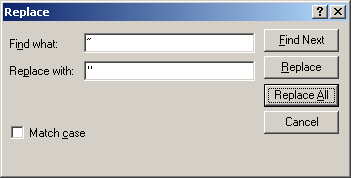
To replace Microsoft Word smart quotes already in a file: Often, however, the file you’ve received already has smart quotes in it.  If you’re going to use the terms in that file, you’ll need to copy them to a text editor first – Notepad or Wordpad (if Wordpad is in plain text document mode) should be fine.  Highlight the beginning quote and copy it to the clipboard (Ctrl+C), then Ctrl+H to open up the Find and Replace dialog, put your cursor in the Find box and press Ctrl+V to paste it in.  Type the character on the keyboard into the Replace box, then press Replace All to replace all beginning smart quotes with straight ones.  Repeat the process for the ending smart quotes.  You’ll also have to do this if you have any single quotes, double-hyphens, fraction characters (e.g., Word converts “1/2” to “½”), etc. that impact your terms.

So, what do you think?  Have you ever run into issues with Word smart quotes or other Word auto formatting options?  Please share any comments you might have or if you’d like to know more about a particular topic.

From all of us at Trial Solutions…Have a Happy Thanksgiving!!

eDiscovery Project Management: Monitor the Work

 It’s critical to know where you are on a project so you can compare your progress to your budget and schedule and make adjustments if necessary.  Sometime the unexpected will cause you to fall behind.  In some cases, you’ll be able to take steps to fix problems and get back on track.  For example, you may be able to simplify a task without sacrificing quality or the utility of the work.

Here’s an example.  I once managed a coding project that was having problems.  The rate at which the staff moved through the collection was much slower than I had estimated.  At that slower rate, the deadline was going to be missed and the costs were going to skyrocket.  I met with the staff to determine why the work was taking so much time.  We determined that there was one field of information that was causing trouble:  coders were required to record the country in which certain types of activity occurred.  It was easy enough to record “United States” when something happened in New York.  It wasn’t so easy for the staff to record “Botswana” when something happened in Ghanzi.  I spoke with an attorney about the problem.  She determined that what they really needed to know was whether an activity occurred in the US, in England, or somewhere else.  We simplified the coding rule and we were able to get back on track.  If we hadn’t been monitoring daily progress on the project, we would have faced significant schedule and budget problems.

Changing the rules might not always be an option.  Sometimes you’ll have to live with an extended schedule and higher costs.  Knowing that sooner rather than later is always better.  If you can’t adjust the rules, you can at least adjust the expectations of those for whom you are doing the work.

Put a mechanism in place for monitoring status.  Look at production rates and throughput every day and see how the numbers compare to the assumptions you made when you created your schedule and budget.   A missed deadline or unexpected costs should never be a surprise that comes at the end of a project.

What do you think?  Have you missed deadlines and exceeded budgets?  Could it have been avoided?  Please share your comments or let us know if you would like more information on a topic.

eDiscovery Trends: Facemail and eDiscovery

Email is dead.

So says Facebook founder Mark Zuckerberg.  “It’s too formal,” he declared, announcing his company’s new messaging service last week in San Francisco.

Facebook announced last week that it’s rolling out a new messaging system, including chat, text messaging, status updates and email (surprise!).  Zuckerberg touts it as a way of bringing messaging systems together in one place, so you don’t have to remember how each of your friends prefers to be contacted.  Will the integrated product (informally dubbed “Facemail”) that some have called “Gmail killer” be a serious threat to Gmail, MSN and Yahoo Mail?  Maybe.  With 500 million plus users, Facebook certainly has a head start towards a potentially large user base.

However, some caveats to consider from a business standpoint:

  1. Facemail messages will be clustered by sender instead of by subject, which they consider to be “antiquated”.  May be great from a social standpoint, but not so good when you need to follow the thread of a conversation with multiple people.
  2. Unified messaging is not an entirely new concept.  Just last year, Google introduced Google Wave, designed to “merge key features of media like e-mail, instant messaging, wikis, and social networking”.  Earlier this year, Google announced plans to scrap Google Wave after it failed to gain a significant following.  It will be interesting to see whether Facebook can succeed where Google failed.
  3. From an eDiscovery perspective, the potential concern is that Facebook plans to preserve these messages, regardless of the form in which they are generated, forever.  So, if your company has a retention policy in place, these communications will fall outside of that policy.

Is it time to panic?  It might be tempting to overreact and ban the use of Facemail and other outside email and social media sites, but that seems impractical in today’s social media climate.

A better approach is to have a policy in place to govern use of outside email, chat and social media that covers what employees should do (e.g., act responsibly and ethically when participating in online communities), what employees should not do (e.g., disclose confidential information, plagiarize copyrighted information, etc.) and the consequences for violating the policy (e.g., lost customers, firings, lawsuits, etc.).  We will talk more about a social governance policy in an upcoming post.  In the meantime, here is a reference to our September post for information on requesting information from Facebook via civil subpoena.

So, what do you think?  Does your company have a social governance policy?  Please share any comments you might have or if you’d like to know more about a particular topic.

P.S. – So, what happened to the architect behind Google Wave, Lars Rasmussen?  He just joined Facebook.  Interesting, huh?  🙂

eDiscovery Trends: Sedona Conference Commentary on Proportionality

 Last month, The Sedona Conference® made available its Commentary on Proportionality in Electronic Discovery, which is a project of The Sedona Conference Working Group on Electronic Document Retention & Production (WG1).  The commentary is initially being published as a “public comment version”, giving participants in the legal industry an opportunity to provide comments that the editors will review and incorporate edits where appropriate into the final version.  A copy of the PDF publication can be downloaded here.

The commentary discusses the origins of the doctrine of proportionality, provides examples of its application and proposes principles for guidance, providing “a framework for the application of the doctrine of proportionality to all aspects of electronic discovery”.  Among other things, the publication identifies six Principles of Proportionality intended to provide that framework, using existing (Federal) rules and case law to support each principle.  These common-sense principles are:

  1. The burdens and costs of preservation of potentially relevant information should be weighed against the potential value and uniqueness of the information when determining the appropriate scope of preservation.
  2. Discovery should generally be obtained from the most convenient, least burdensome, and least expensive sources.
  3. Undue burden, expense, or delay resulting from a party’s action or inaction should be weighed against that party.
  4. Extrinsic information and sampling may assist in the analysis of whether requested discovery is sufficiently important to warrant the potential burden or expense of its production.
  5. Nonmonetary factors should be considered when evaluating the burdens and benefits of discovery.
  6. Technologies to reduce cost and burden should be considered in the proportionality analysis.

After stating the six principles above, the commentary goes on to discuss specific rules and case law that supports issues to consider such as the availability of information from other sources, waiver and undue delay, and burden versus benefit.  It then goes on to discuss the existing rules and case law that supports each principle.

To submit a public comment, you can download a public comment form here, complete it and fax(!) it to The Sedona Conference® at 928-284-4240.  If, like me, you’re opposed to using 1990s technology to submit your comments, the publication also notes that you can also submit feedback by emailing them at rgb@sedonaconference.org.

So, what do you think?  Have you encountered any cases where proportionality of discovery requests are at issue? Please share any comments you might have or if you’d like to know more about a particular topic.

eDiscovery Trends: CGOC Information Governance Benchmark Report

Last month, at the EDRM Mid-Year Meetings, the Information Management Reference Model (IMRM) team within EDRM presented a status report for their project (as all of the project teams do during these meetings).  As a part of that presentation, the team presented findings from the first survey conducted by the Compliance, Governance and Oversight Council (CGOC) in collaboration with the IMRM of legal, records management (RIM) and IT practitioners in Global 1000 companies.  You can request a copy of the report here.

According to the CGOC report, there was an even distribution of respondents between legal, RIM and IT.  Just a few of the very interesting findings include:

    • Ineffective Disposal of Data: 75% of respondents identified the inability to defensibly dispose of data as the greatest challenge, leaving “massive” amounts of legacy data,
  • “People Glue” Compliance Processes: 70% of respondents depend on “liaisons and people glue” to support discovery and regulatory obligations within information management (as opposed to reliable and repeatable systems and processes),
  • Disconnect Between Legal, RIM and IT: There are big gaps between retention schedule development, legal hold communication, and information management.  Some key stats:
    • 77% said their retention schedules were not actionable as is or could only be applied to paper,
    • 75% of schedules included only regulatory record keeping requirements or long-range business information,
    • 66% did not describe legal holds by the records associated with them, and
    • 50% of IT departments never used the retention schedule when disposing of data.
  • Who’s In Charge?: Legal and RIM identified RIM as the organization responsible for “information management and disposal” whereas IT considered themselves responsible for this function.

These are just a handful of findings in this report, which clearly shows that most large organizations still feel that there is still much work to be done to achieve an effective information governance program.  The CGOC (and IMRM) have done a terrific job at compiling a comprehensive and informative report that illustrates the current state of affairs of information management in the corporate world.  Request your copy of the report to learn more!

So, what do you think?  How is your organization managing information governance?  Is it facing similar issues? Please share any comments you might have or if you’d like to know more about a particular topic.

eDiscovery Project Management: Review the Work

Yesterday, we talked about resolving questions quickly and keeping team members informed about changes to procedures to minimize the chance for significant rework.  However, even with the best staff, mistakes happen — especially on projects that require a team of people.  There are two general types of errors you can expect:

  • Errors that are made because someone doesn’t properly understand the task.  They have misunderstood the procedures or misinterpreted a subjective component of the work.
  • Errors that are made simply because it is inevitable.  People have bad days.  They get tired.  Knowing how to do something doesn’t mean you will do it right every time.

The first type of error is easy to identify and fix.  Check initial work quickly and give immediate feedback.  I always distribute small batches of initial work at the beginning of a task – work that an individual can finish quickly.  Then I have that first initial batch for each person checked thoroughly and right away.  Misinterpretations of the procedures or the criteria are evident and can be dealt with right away, before a lot of work has been done.

Catching the second type of error is a little more difficult unless your schedule and budget permit you to check 100% of the work.  With a good staff, that’s probably overkill.  But, it’s important that work is spot-checked throughout the life of a project, and that an intelligent approach is used to isolate problems.  For example, if you find a few careless errors made by a staff member, see if you can isolate all of the work that person did on that day and check it completely.  Or perhaps you’ll identify a particular type of document or situation that caused problems, and you can take steps to isolate just those documents or situations.  Very often you can apply a systematic approach to finding and fixing errors.

What do you think?  Have you worked on projects where quality control reviews were absent or inadequate and work quality suffered?  Please share your comments or let us know if you would like more information on a topic.